{"componentChunkName":"component---src-templates-project-js","path":"/projects/time-to-have-more-fun","result":{"data":{"strapiProject":{"id":"Project_8","name":"Time to Have More Fun","Description":"A single-page web app for helping me choose where to travel, built with Next.js, Firebase, and Tailwind CSS","Content":"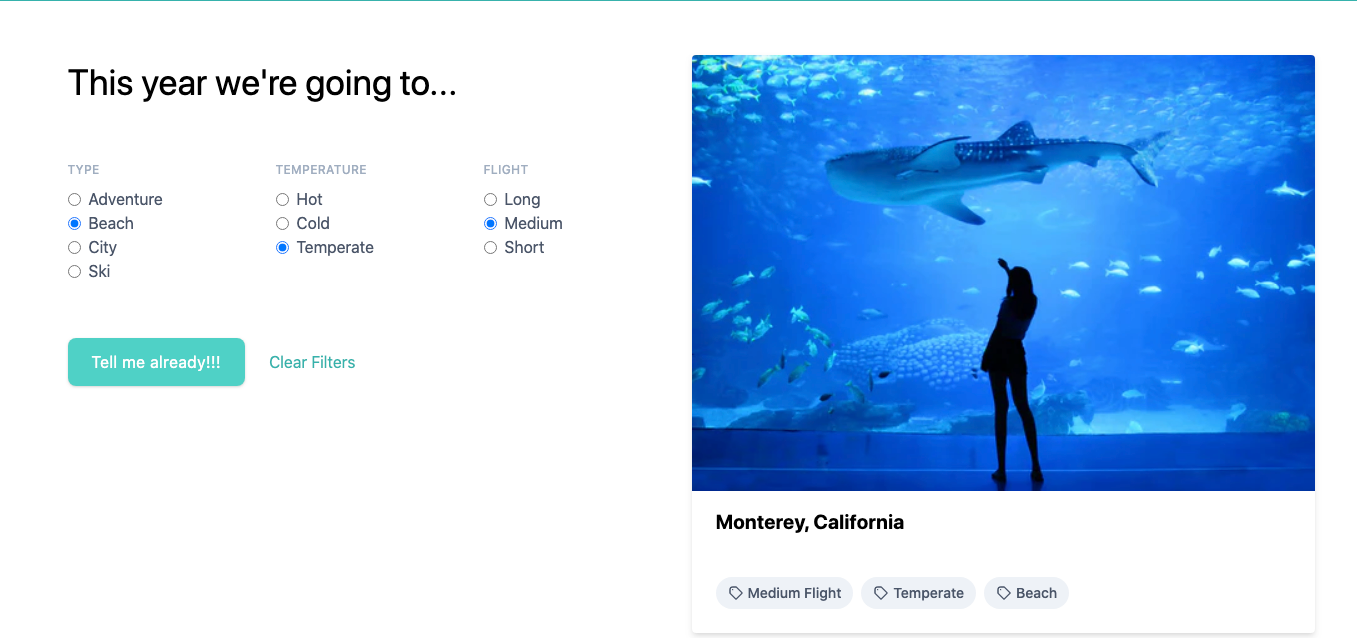\n\nA small web app to help me decide where to travel, built with [Next.js](https://nextjs.org/), [Firebase](https://firebase.google.com/), and [Tailwind CSS](https://tailwindcss.com/).\n\n ```Sorry, I can't make public repo at this time, but I will share this repository in this month. ```\n\n## Set up\n\n1. yarn\n2. npm install -g now\n3. Set up [now secrets](https://zeit.co/docs/v2/serverless-functions/env-and-secrets) for Firebase env variables\n4. now dev\n\n---\n\nThis project was bootstrapped with [Create Next App](https://github.com/segmentio/create-next-app).\n\nFind the most recent version of this guide, And check out [Next.js repo](https://github.com/zeit/next.js) for the most up-to-date info.\n\n## Table of Contents\n\n- [Time to have more fun!](#time-to-have-more-fun)\n - [Set up](#set-up)\n - [Table of Contents](#table-of-contents)\n - [Questions? Feedback](#questions-feedback)\n - [Folder Structure](#folder-structure)\n - [Available Scripts](#available-scripts)\n - [npm run dev](#npm-run-dev)\n - [npm run build](#npm-run-build)\n - [npm run start](#npm-run-start)\n - [Using CSS](#using-css)\n - [Adding Components](#adding-components)\n - [./components/simple.js](#componentssimplejs)\n - [./components/complex.js](#componentscomplexjs)\n - [Fetching Data](#fetching-data)\n - [./pages/stars.js](#pagesstarsjs)\n - [Custom Server](#custom-server)\n - [Syntax Highlighting](#syntax-highlighting)\n - [Deploy to Now](#deploy-to-now)\n - [Something Missing](#something-missing)\n\n## Questions? Feedback\n\nCheck out [Next.js FAQ & docs](https://github.com/zeit/next.js#faq) or [let me know](https://github.com/vercel/create-next-app) your feedback.\n\n## Folder Structure\n\nAfter creating an app, it should look something like:\n\n```md\n.\n├── README.md\n├── components\n│ ├── head.js\n│ └── nav.js\n├── next.config.js\n├── node_modules\n│ ├── [...]\n├── package.json\n├── pages\n│ └── index.js\n├── static\n│ └── favicon.ico\n└── yarn.lock\n```\n\nRouting in Next.js is based on the file system, so `./pages/index.js` maps to the `/` route and\n`./pages/about.js` would map to `/about`.\n\nThe `./public` directory maps to `/` in the `next` server, so you can put all your\nother static resources like images or compiled CSS in there.\n\nOut of the box, we get:\n\n- Automatic transpilation and bundling (with webpack and babel)\n- Hot code reloading\n- Server rendering and indexing of `./pages`\n- Static file serving. `./public/` is mapped to `/`\n\nRead more about [Next's Routing](https://github.com/zeit/next.js#routing)\n\n## Available Scripts\n\nIn the project directory, you can run:\n\n### npm run dev\n\nRuns the app in the development mode. \nOpen [http://localhost:3000](http://localhost:3000) to view it in the browser.\n\nThe page will reload if you make edits. \nYou will also see any errors in the console.\n\n### npm run build\n\nBuilds the app for production to the `.next` folder. \nIt correctly bundles React in production mode and optimizes the build for the best performance.\n\n### npm run start\n\nStarts the application in production mode.\nThe application should be compiled with \\`next build\\` first.\n\nSee the section in Next docs about [deployment](https://github.com/zeit/next.js/wiki/Deployment) for more information.\n\n## Using CSS\n\n[`styled-jsx`](https://github.com/zeit/styled-jsx) is bundled with next to provide support for isolated scoped CSS. The aim is to support \"shadow CSS\" resembling of Web Components, which unfortunately [do not support server-rendering and are JS-only](https://github.com/w3c/webcomponents/issues/71).\n\n```jsx\nexport default () => (\n
\n Hello world\n
scoped!
\n \n
\n);\n```\n\nRead more about [Next's CSS features](https://github.com/zeit/next.js#css).\n\n## Adding Components\n\nWe recommend keeping React components in `./components` and they should look like:\n\n### `./components/simple.js`\n\n```jsx\nconst Simple = () =>
Simple Component
;\n\nexport default Simple; // don't forget to export default!\n```\n\n### `./components/complex.js`\n\n```jsx\nimport { Component } from 'react';\n\nclass Complex extends Component {\n state = {\n text: 'World',\n };\n\n render() {\n const { text } = this.state;\n return
Hello {text}
;\n }\n}\n\nexport default Complex; // don't forget to export default!\n```\n\n## Fetching Data\n\nYou can fetch data in `pages` components using `getInitialProps` like this:\n\n### `./pages/stars.js`\n\n```jsx\nconst Page = props =>
Next stars: {props.stars}
;\n\nPage.getInitialProps = async ({ req }) => {\n const res = await fetch('https://api.github.com/repos/zeit/next.js');\n const json = await res.json();\n const stars = json.stargazers_count;\n return { stars };\n};\n\nexport default Page;\n```\n\nFor the initial page load, `getInitialProps` will execute on the server only. `getInitialProps` will only be executed on the client when navigating to a different route via the `Link` component or using the routing APIs.\n\n_Note: `getInitialProps` can **not** be used in children components. Only in `pages`._\n\nRead more about [fetching data and the component lifecycle](https://github.com/zeit/next.js#fetching-data-and-component-lifecycle)\n\n## Custom Server\n\nWant to start a new app with a custom server? Run `create-next-app --example customer-server custom-app`\n\nTypically you start your next server with `next start`. It's possible, however, to start a server 100% programmatically in order to customize routes, use route patterns, etc\n\nThis example makes `/a` resolve to `./pages/b`, and `/b` resolve to `./pages/a`:\n\n```jsx\nconst { createServer } = require('http');\nconst { parse } = require('url');\nconst next = require('next');\n\nconst dev = process.env.NODE_ENV !== 'production';\nconst app = next({ dev });\nconst handle = app.getRequestHandler();\n\napp.prepare().then(() => {\n createServer((req, res) => {\n // Be sure to pass `true` as the second argument to `url.parse`.\n // This tells it to parse the query portion of the URL.\n const parsedUrl = parse(req.url, true);\n const { pathname, query } = parsedUrl;\n\n if (pathname === '/a') {\n app.render(req, res, '/b', query);\n } else if (pathname === '/b') {\n app.render(req, res, '/a', query);\n } else {\n handle(req, res, parsedUrl);\n }\n }).listen(3000, err => {\n if (err) throw err;\n console.log('> Ready on http://localhost:3000');\n });\n});\n```\n\nThen, change your `start` script to `NODE_ENV=production node server.js`.\n\nRead more about [custom server and routing](https://github.com/zeit/next.js#custom-server-and-routing)\n\n## Syntax Highlighting\n\nTo configure the syntax highlighting in your favorite text editor, head to the [relevant Babel documentation page](https://babeljs.io/docs/editors) and follow the instructions. Some of the most popular editors are covered.\n\n## Deploy to Now\n\n[now](https://zeit.co/now) offers a zero-configuration single-command deployment.\n\n1. Install the `now` command-line tool either via the recommended [desktop tool](https://zeit.co/download) or via node with `npm install -g now`.\n\n2. Run `now` from your project directory. You will see a **now.sh** URL in your output like this:\n\n ```\n > Ready! https://your-project-dirname-....now.sh (copied to clipboard)\n ```\n\n Paste that URL into your browser when the build is complete, and you will see your deployed app.\n\nYou can find more details about [now here](https://zeit.co/now).\n\n## Something Missing\n\nIf you have ideas for how we could improve this or the project in general, please kindly contact me.\n","LiveURL":"https://time-to-have-more-fun.now.sh/","skills":[],"PublishData":"2020-01-20","strapiId":8}},"pageContext":{"slug":"time-to-have-more-fun"}}}